


ID: 100034846
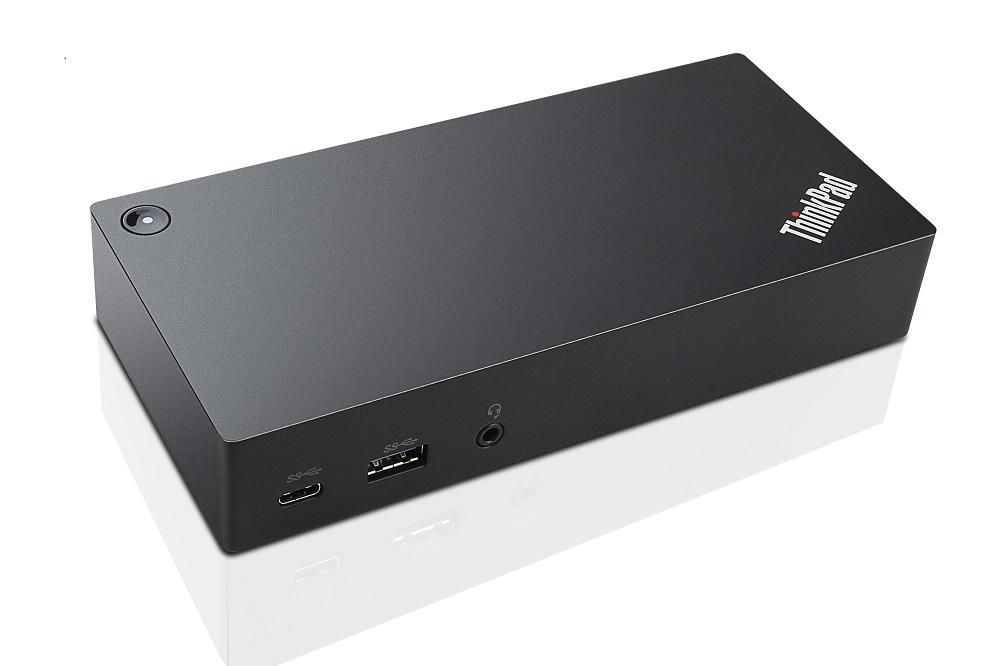
ThinkPad USB C-Dock Lenovo 40A90090IT-RFB

EAN
5715063024645
Refurbished product
Best price
6 873 ₴
incl. VAT
In stock: 10-19 pcs
Delivery: 2–4 weeks
The ThinkPad USB-C Dock is a new universal docking solution ensuring a productive workstation. Experience all your productivity needs including video, data, and wired network all while delivering continuous power to your laptop via a robust USB Type-C port. Simply connect your laptop or tablet with the dock and boost your productivity in no time. Single UHD display30Hz or dual FHD displays allow you to enjoy a vivid video experience.Always Connected via USB Type-C
A Power Hub for Your Desk
Experience up to 60W of stable, reliable, and continuous power for your laptop or tablet ensuring your station is always ready for peak productivity. Apart from charging your notebook or tablet and mobile device charging with 15W and 10.5W from the USB-C port and USB 3.0 always power on port respectively.
An Unprecedented View
Enjoy a vivid video experience with an Ultra High Definition (UHD – 4K) display or take multi-tasking to a new level two FHD (1080p) displays.
An Enterprise Flagship
Supports network manageability for your ThinkPad system such as PXE boot, system Wake-On LAN from Sleep mode, Hibernate mode, or Power-off mode, and Pass through ThinkPad notebook MAC address to the dock.
Complete Control of Your Device
Once your ThinkPad device is connected to the dock, the power button on the dock mirrors the system power button – simply press it to power your system ON or OFF.
A Power Hub for Your Desk
Experience up to 60W of stable, reliable, and continuous power for your laptop or tablet ensuring your station is always ready for peak productivity. Apart from charging your notebook or tablet and mobile device charging with 15W and 10.5W from the USB-C port and USB 3.0 always power on port respectively.
An Unprecedented View
Enjoy a vivid video experience with an Ultra High Definition (UHD – 4K) display or take multi-tasking to a new level two FHD (1080p) displays.
An Enterprise Flagship
Supports network manageability for your ThinkPad system such as PXE boot, system Wake-On LAN from Sleep mode, Hibernate mode, or Power-off mode, and Pass through ThinkPad notebook MAC address to the dock.
Complete Control of Your Device
Once your ThinkPad device is connected to the dock, the power button on the dock mirrors the system power button – simply press it to power your system ON or OFF.
Recommended products
Lenovo / MPN: 5D11B49275
Lenovo 100e Chrome AMD INX 11.6" HD TN AG 250nit 50%CG DC M
3 423 ₴

Lenovo / MPN: 5D10N87520
Lenovo LCD NT116WHM-N42 V8.0 HDT AG S NB
3 423 ₴
Lenovo / MPN: 5D10N24832
Lenovo IN N116BCA-EA1 C1 HDI AG S NB
7 823 ₴

Lenovo / MPN: 5D10H11015
Lenovo LCD B116XTN02.3 2B HD AG S NB
3 423 ₴

Lenovo / MPN: 5D11U36897
13.3-inch FHD IPS LCD panel
6 530 ₴
Lenovo / MPN: 5D11U27679
13.3-inch WUXGA IPS display,
7 518 ₴
You also viewed
To catalog →

HP / MPN: RM1-7387-000CN
Duplex assembly for HP
Price on request

OKI / MPN: 42264116
Board GRH, B44/4600
Price on request

Dell / MPN: BCM5709C-HP-RFB
BROADCOM 5709C QUAD PORT
Price on request
Dell / MPN: T184N-RFB
POWEREDGE M910 HEATSINK
Price on request
Bachmann / MPN: 924.109
rocker switch series 3652
Price on request
Lenovo / MPN: 03LD735
CABLE MCIO 148p ST to MCIO
Price on request